Things To Know About YouTube Premium For Students In 2023

by

01 August 2023

Youtube

YouTube Student Premium

Have you been searching for information related to the YouTube Premium student membership? If yes, then you are going to find this article to be of great help!

YouTube is extremely popular worldwide. It is one of the most widely used social media sites for streaming videos. The website offers users the option to broadcast live in addition to watching internet videos.

You may enjoy your perks on YouTube, YouTube Music, and YouTube Kids once you sign up for YouTube Premium.

If you have been searching for a step-by-step guide to know the same, you need to keep scrolling.

Read till the end to learn more…

How To Get YouTube Premium Student?  

How To Get YouTube Premium Student?  

While life can otherwise be tough for students, with their neverending syllabus and traumatizing exam, it can be great for them to get the hand of the popular discounted YouTube Premium membership.

If you are a student, you will be happy to know that you can get YouTube Premium at a much-discounted price.

Here are the steps that you must take to get a Youtube premium Membership for students:

1. Head over to the official website of YouTube Premium web page.

2. Click on the option that reads “Family or Student Plan.”
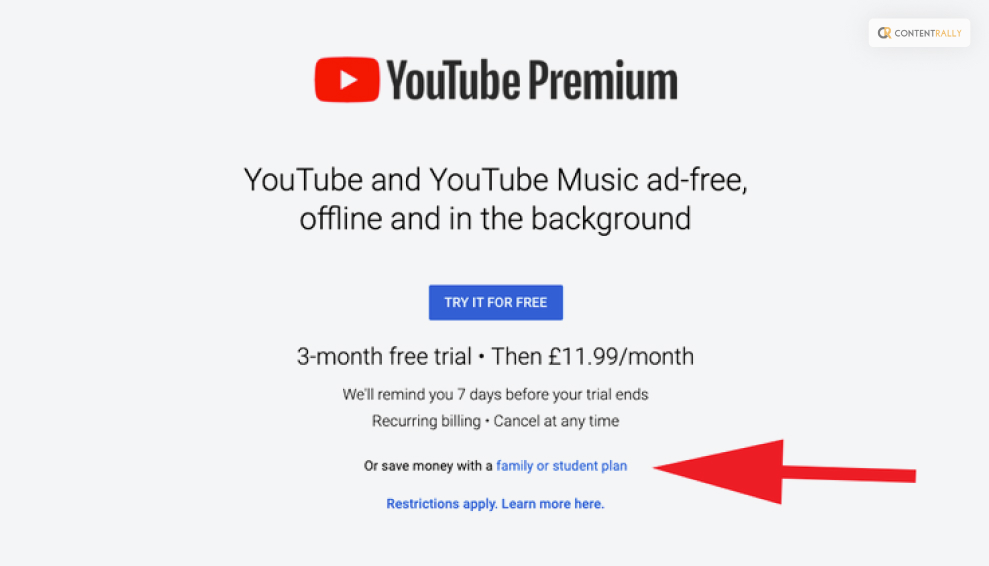
Click on the option that reads “Family or Student Plan

3. Click on the ‘Try It For Free’ option that you might be able to see beside the Student Plan.
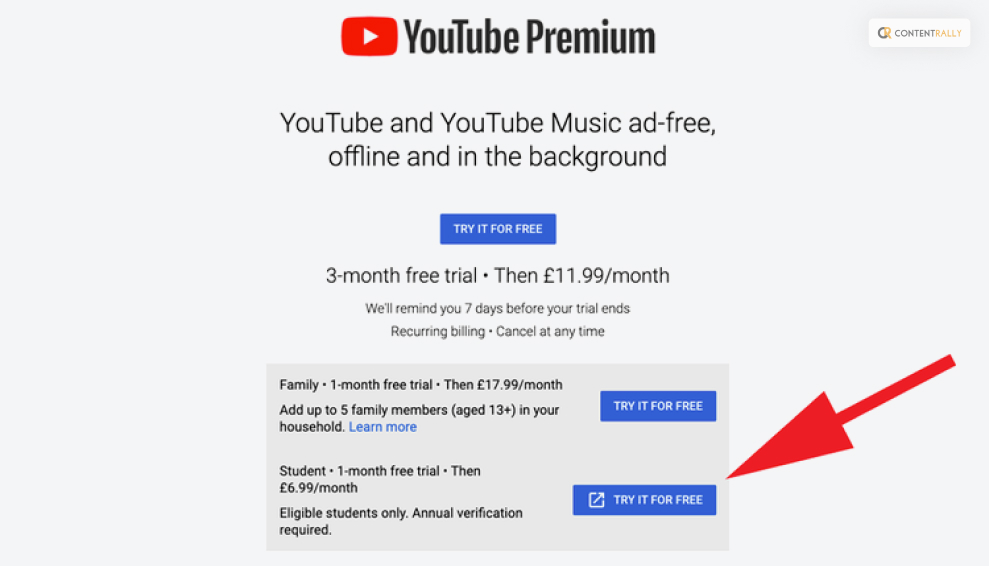
Click on the ‘Try It For Free’ option that you might be able to see beside the Student Plan

4. A pop-up box informing you that you’re about to be routed to the SheerID website for verification will appear.

5. To continue, click Continue.
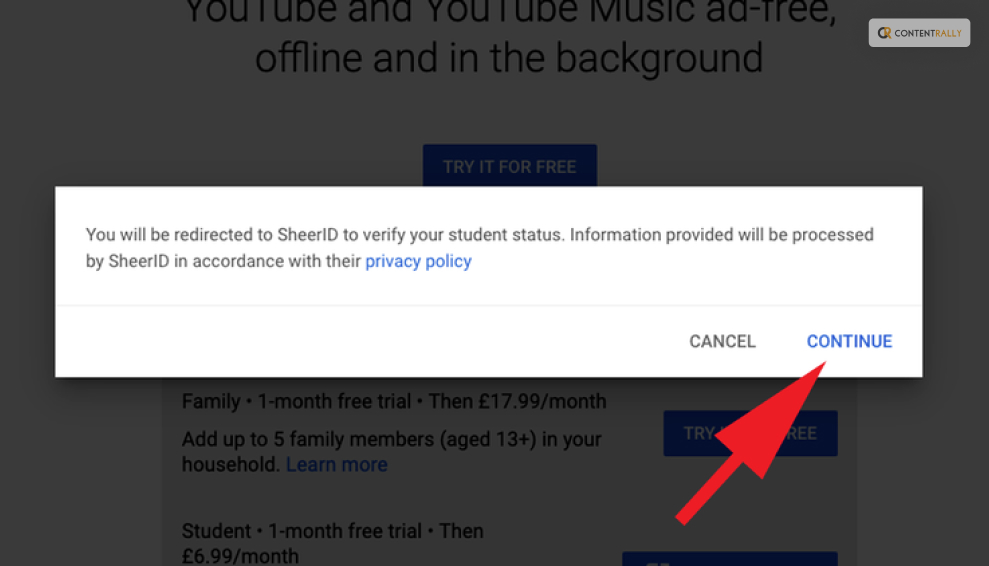
To continue, click Continue.

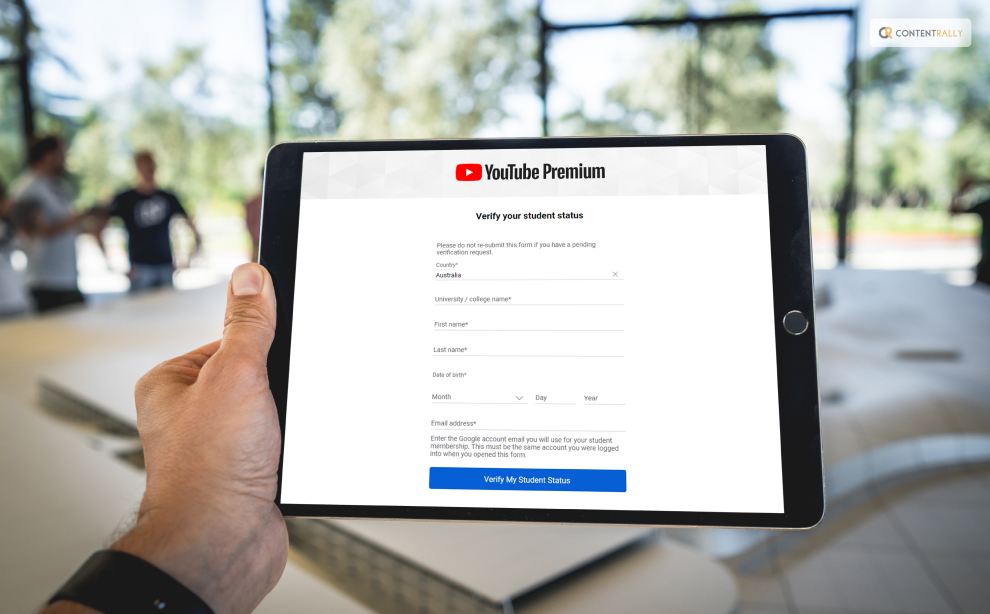
6. Fill out the form to verify that you are a student.

7. To go to the stage where you might have to upload your papers for SheerID to validate them, click Next.

8. The validation procedure will begin when you click Submit.
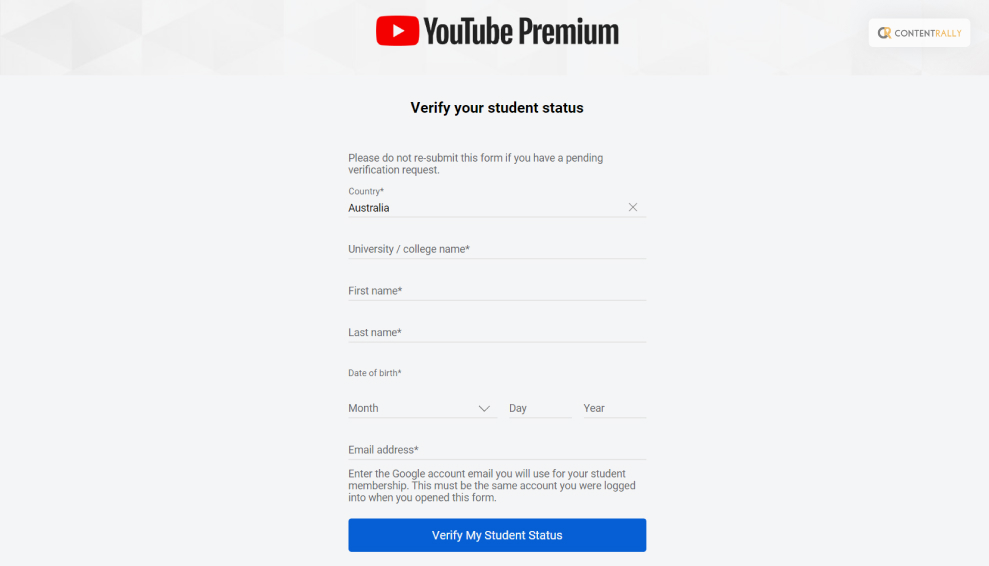
The validation procedure will begin when you click Submit

How To Know If You Are Eligible For YouTube Premium Student Membership?  

You must keep one thing in mind if you plan to get a Youtube Premium Student membership. And that is whether you are eligible for this or not!

You must be registered as a student at an institution of higher learning where YouTube student memberships are available and which SheerID has approved to sign up for one. SheerID determines the institution’s eligibility.

Benefits Of YouTube Premium Student  
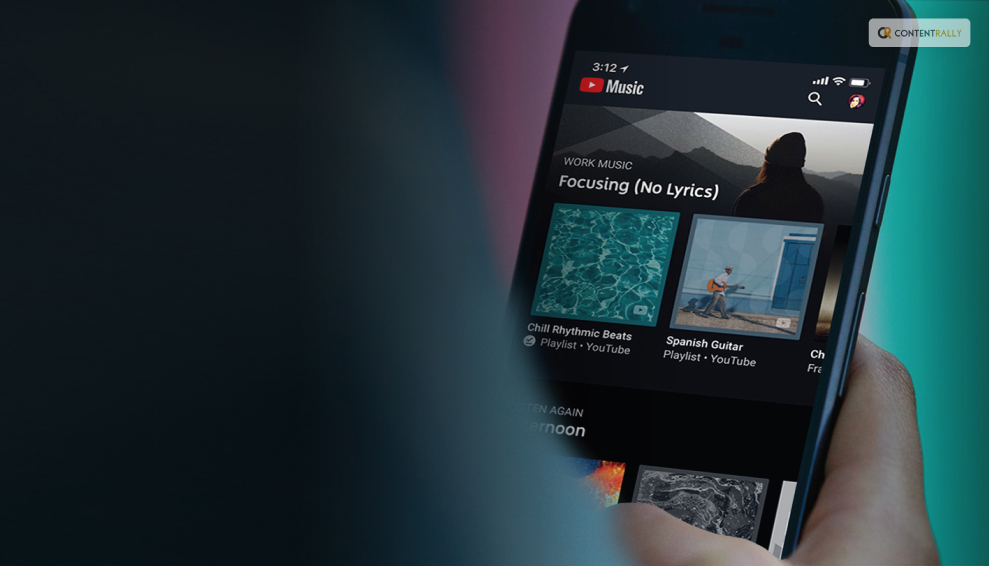
Benefits Of YouTube Premium Student  

If you want to know about the benefits of having YouTube Student Premium, I have you covered! Take a look at some of the ways in which getting this discounted membership can be of great advantage to you while using this platform:

1. Downloads  

The first advantage you can have with YouTube Premium membership for students is that you can easily download and save videos for later. This way, you can watch these videos when you really need them— like when you’re on a plane or commuting.

2. Ad-free  

If you are one of those people, who is absolutely annoyed by the constant interruption caused by the ads? If yes, then this is the perfect plan for you! Enjoys your favorite videos and listen to the music ad-free, without any unnecessary interruption.

3. Back Ground Play  

One of the best things about having YouTube Premium is that you can enjoy the music while using other apps. Yes, that’s right! Unlike the normal YouTube platform or app, you do not have to worry about the content freezing or pausing while you temporarily step out of the platform. Whatever you are watching or listening to will continue in the background.

4. YouTube Music Premium  

Last but not least, with a YouTube Premium membership, you also get access to the best and most vast library of songs and music collections. According to the platform, you can “Download [their] new music app and listen without interruptions.” this means that you do not have to separately pay for using YouTube Music. Everything comes with this one membership.

Which Countries Are Eligible For Student YouTube Premium Membership?  

Which Countries Are Eligible For Student YouTube Premium Membership?  

Here is a list of the countries and states that are eligible for Student membership of YouTube Premium. Take a look at this:

  • Australia
  • Austria
  • Bahrain
  • Belgium
  • Bolivia
  • Brazil
  • Bulgaria
  • Canada
  • Chile
  • Colombia
  • Costa Rica
  • Cyprus
  • Czech Republic
  • Denmark
  • Dominican Republic
  • Ecuador
  • Egypt
  • El Salvador
  • Finland
  • France
  • Germany
  • Greece
  • Guatemala
  • Honduras
  • Hong Kong
  • Hungary
  • India
  • Indonesia
  • Ireland
  • Italy
  • Japan
  • Kuwait
  • Lebanon
  • Luxembourg
  • Malaysia
  • Malta
  • Mexico
  • Netherlands
  • New Zealand
  • Nicaragua
  • North Macedonia
  • Norway
  • Oman
  • Panama
  • Paraguay
  • Peru
  • Philippines
  • Poland
  • Portugal
  • Qatar
  • Romania
  • Russia
  • Saudi Arabia
  • Singapore
  • Slovakia
  • South Africa
  • Spain
  • Sweden
  • Switzerland
  • Taiwan
  • Thailand
  • Turkey
  • Ukraine
  • United Arab Emirates
  • United Kingdom
  • United States
  • Uruguay
  • Vietnam

What Is Included In YouTube Premium Students Membership?  

What Is Included In YouTube Premium Students Membership?  

Now that you know the benefits of this membership and how it can help you, you must be thinking about whether there are any other services you might be able to avail of through this. And the answer is YES.

Everything that comes under YouTube, from the platform itself to the music app, each and every service is covered under this one membership.

Here is what you need to know:

1. YouTube  

  • Ad-free YouTube: Watch unaffected by adverts millions of videos.
  • Download videos to watch offline: On mobile devices, store playlists, and movies so you can access them offline.
  • Play in the background: Play videos even while your screen is off or when using other apps.

2. YouTube Music  

  • Explore: Easily explore the world of music with the new and improved YouTube Music app
  • Ad-free music: Watch unaffected by adverts millions of videos.
  • Download music to listen offline: On mobile devices, store playlists, and movies so you can access them offline.
  • Play in the background: Play videos even while your screen is off or when using other apps.

3. YouTube Kids  

  • Offline play and an ad-free YouTube Kids app are also available through this membership.

How To Know If YouTube Student Premium Membership Is Available In Your School?  

How To Know If YouTube Student Premium Membership Is Available In Your School?

Before applying for the students’ membership of YouTube Premium, there is something that you must do— check whether or not your school offers that service.

Here is what you must do for the same:

  • Visit the YouTube Premium or YouTube Music Premium landing page for students.
  • Click on the option that reads “Get Premium.”
  • On the SheerID form, type in your school’s name. Student plans are accessible if your school is included on the list.

Wrapping It Up!  

In case you want some information related to YouTube Premium students, I hope that this article has been of help to you. If there are any other queries related to the same, kindly feel free to let me know. All you need to do is scroll down until you reach the page’s bottom. Then leave your queries and suggestions in the box below. And I will be there to answer them all for you.

Learn More About:
Ankita Tripathy loves to write about food and the Hallyu Wave in particular. During her free time, she enjoys looking at the sky or reading books while sipping a cup of hot coffee. Her favourite niches are food, music, lifestyle, travel, and Korean Pop music and drama.

View all posts

Leave a Reply

Your email address will not be published. Required fields are marked *

Related

how to upload a video to youtube

Lights, Camera, Action: Your Comprehensive Guide to Uploading on YouTube

With billions of people that are online every day, YouTube is a goldmine for prospective content producers. It's one thing to understand how to launch a YouTube channel. It is a whole different thing to be aware of how to expand your YouTube channel like a pro. It involves more than just uploading films in the fast-paced digital world of today; it also entails building real relationships, inspiring creativity, and embracing the craft of storytelling. Imagine a cooking show where a great chef delivers delectable recipes and captivates viewers with their contagious enthusiasm for culinary treats. Or imagine a travel writer who chronicles amazing adventures throughout the world. You could transport readers to gorgeous locales through captivating narratives and stunning images. Who would not hit "like" and "subscribe" if they were a tourist or foodie? We'll cover the methods for producing captivating videos that leave an impression on viewers. We will also talk about optimizing material for search engines to boost discoverability and foster meaningful connections. With this, you will be navigating YouTube's always-evolving environment with ease. Getting Started  YouTube is the best platform for publishing video material. In fact, YouTube has nearly become synonymous with online video at this point. A billion hours of video are seen on YouTube each day by its more than 1.9 billion monthly active users. That is equivalent to watching video every day for more than 114,000 years, to put it in perspective. Leading YouTube content producers can earn hundreds or even thousands of dollars each day. Ironically, though, creating videos isn't really necessary to succeed and earn money on YouTube. So, how exactly DO you succeed on YouTube? Here are some of the best approaches by YouTubers that demonstrate exactly what you should (and shouldn't) do while creating content for YouTube. Here’s everything, step-by-step, for you  to make a successful YouTube video: Step 1. Create a YouTube video strategy Step 2. Make sure your video is found on YouTube Step 3. Find YouTube ideas and topics Step 4. Understand YouTube equipment for beginners Step 5. Learn the first YouTube video you should make Step 6. Set up your video recording Step 7. Record your desktop Step 8. Edit your video Step 9. Upload your video on YouTube Step 10. Optimize your video for YouTube How To Make Your YouTube Videos Get More Views? Consistency, high-quality material, and audience engagement are essential for content creators. You may efficiently expand your YouTube channel, draw in more visitors, and cultivate a devoted audience by putting the following techniques into practice. Produce Compelling Content:  Now you can make movies that are of the highest caliber, are interesting to watch, and are beneficial to your viewers. Create Thorough Descriptions: Put detailed information, such as keywords, links, timestamps, and calls-to-action (CTAs), in the description box to give viewers. Make Captivating Thumbnails Create thumbnails that appropriately reflect the content of your video and are visually appealing and the right size to entice users to click and watch. Apply this principle to all of your channel's graphics. Use the appropriate YouTube channel banner size and make your profile image something distinctive but instantly recognizable. Always pay close attention to the details! Create Descriptive Titles  For your videos, use interesting and pertinent titles that include keywords to increase their visibility in search results. Use SEO Strategies  To improve your video's position in search results, conduct keyword research and tweak the tags, titles, and descriptions. Engage Your Audience  To establish a close relationship with your audience and encourage loyalty, respond to inquiries, comments, and other feedback. Work Along With Other Artists  To reach a new audience for your channel, collaborate with other like-minded creators in your niche. Use Social Media To Promote  To gain more visibility, post your videos on social media channels, interact with followers, and utilize pertinent hashtags. Cross-Promote Your Content  In blog posts, newsletters, and other online publications that draw in your current audience, include links to your videos. Be Dependable  To keep your audience interested and to let YouTube's algorithm know that your channel is active, maintain a regular upload schedule. Examine And Improve  Review analytics frequently to determine what material resonates with your audience and modify your strategy as necessary. Improve The Design Of Your Channel  To highlight your greatest material, arrange playlists and featured videos on the homepage of your channel. Participate In Communal Life  Join groups and forums on YouTube to exchange ideas and meet other producers and viewers. Draw Interest Right Away  Engage viewers right away by using interesting introductions. Encourage engagement by asking viewers to subscribe, like, comment, and share your content. This will help to build a sense of community around your channel. Use Storyboards To Prepare And Arrange Your Material  Storyboards are visual outlines. You may significantly improve your movies' quality, cut production time, and provide a more polished end result by using them. Make YouTube Shorts  A YouTube Shorts is a little video that serves as an introduction to your material. You may persuade visitors to watch your full-length videos and subscribe to your channel by making captivating Shorts. What Are YouTube Views?  The number of views a video has on YouTube is a key indicator of its success and popularity. It displays the number of times viewers have viewed the video, giving important information on audience interest and engagement. In addition to indicating a wider audience, a higher view count increases the possibility of drawing in more viewers and getting exposure through platform recommendations. Views have financial ramifications for creators that go beyond simple popularity because they support ad income and may lead to sponsorship opportunities. As a result, views are crucial for assessing the effectiveness of videos and tracking the development of YouTube channels. In summary, YouTube views are a crucial metric that measures viewer engagement, promotes visibility, and acts as a crucial yardstick for the success of a video. They capture the audience's reaction, enhancing a creator's influence and setting the road for further development. In other words, more views are better when it comes to growing your YouTube channel. But expanding your channel involves much more than just learning how to increase your YouTube views. Wrapping Up   Building a loyal audience and expanding a profitable YouTube channel can be difficult, especially if your genre has a lot of rivals. Despite this, achieving success is still possible with the right commitment, imagination, and tactics. You can progressively raise your channel's popularity and draw in more viewers by constantly producing interesting material, using SEO to optimize your videos, interacting with your audience, and working with other creators. Check out Contra if you're a freelancer looking to market and manage your services without paying commissions. You can promote your abilities and make connections with potential clients on our Independent-first platform without having to pay any fees. Contra can help you find a freelance social media specialist to aid you if you're a client trying to expand your YouTube channel. Learn More About Youtube's: Is Youtube Social Media? Know Your Answer Here What Is YouTube Automation? Everything You Need To Know Youtube’s Ad Sales For Q3 Fy23 Surged By 12.5%, Reaching Nearly $8 Billion

READ MOREDetails
YouTube Intro

A 5-Minute Tutorial on Making YouTube Intro for Newbies

YouTube intro is a special section that presents a brief overview of the video to get an idea of what it’s about. In other words, it acts as a prologue. The purpose of these videos is to introduce something new to the viewer, play with their emotions, and draw them in. That’s why you must try this YouTube intro maker. As a rule, one has to have adequate knowledge of the technical stuff involved in this process. But once you have mastered all the basics, you will be ready to go. If you are planning to create a YouTube video intro, then below are some points that you may find helpful, especially as a newbie: Be Clear With The Theme and Title: So, how do you make an attractive intro? The first thing that you need to consider is the title. Make sure that your title adheres to the theme of your video. Make sure that you are not confusing your viewers. Ideally, the point here is that you should be clear with your video’s piece and title. Besides, you also need to make your YouTube intro video catchy. For example, you have to create an interesting thumbnail to attract the viewers. Other aspects are essential to consider before you upload the clip. However, there is no such thing as perfect. You may fail once, but you can succeed the second time. Failure does not necessarily mean that you should stop trying because sometimes, it's good to learn from your mistakes even if you fail. Get a Catchy Tune While Using the YouTube Intro Maker Software: For an even wider selection of royalty-free music, check out Artlist. You can even get started with 2 months free by using this Artlist discount code. The actual intro is the first few seconds. This is when most people watch your video. So, you must create a catchy tune or melody for it. You can also try to write a short script for it if you think you don’t have the requisite skills. Ensure that you don’t get too bored with the tunes you pick while using the YouTube Intro Maker. Most of these tools have royalty-free themes that you can take advantage of when creating intros for your channel. Insert Text with the YouTube Intro Maker Tool: Whenever it comes to choosing the textual for the introduction, you do have several choices. Your channel name, other social networking sites, and a short overview of what your stream does are only a few examples. Let your content be conspicuous as well as fun to digest. The introduction must capture the interest of the audience, and difficult-to-read text would not suffice. To emphasize the sentences, use different colors for the script and the context. Bold colors draw interest and encourage fans to continue watching for more extended periods. Adjust the Length Using the YouTube Intro Maker Tool: An introduction clip does not have to be very long. A lengthy introduction can indeed be annoying, causing audiences to move on to another one. This is why, after you've inserted whatever you need in the clip, you can trim it downwards. It really should generally be no more than ten seconds long, but it must also be able to promote your brand precisely. And a good YouTube Intro Maker tool will help you achieve the correct length of the video. Ensure the Style is Okay: Check the intro video when you've already completed it. This is to help ensure it suits your specific identity and how you market your stuff. Correct any errors and make your introduction appear just the way you would like it to. A good YouTube Intro Maker should still help you out when you want to make excellent progress. Choose the Right Type of Intro When Using a YouTube Intro Maker Tool: The post, theme, and duration of YouTube introductions can all differ. Examine what other platforms in about the same segment are doing with their content to build the introduction you desire. This will help you come up with ideas for your introduction. Several of them might use it to create a unique and entertaining form to market their clip with the channel name. When you start your stream, you ought to have a clear understanding of what your online persona is and how you'd like to present it. Decide on the colors you would like to use, your platform handle, clips you'll make, and so on. Remember to Add Images: One might just want to include any icons in the YouTube introduction, such as their logos. When you're a brand, it can be pretty helpful in determining who's behind the footage. And if you aren't, it could be a perfect way to put your self-image in the spotlight. Photos can also have a backdrop that blends into the film after the introduction is over. Final Thoughts: For the newbies who had no idea how to make their intros, this tutorial should act as a guide to help you out. But the first and foremost thing you need to do is find the best YouTube Intro Maker tool. Read Also: How to make money on youtube Looking For The Best YouTube To MP3 Downloader? Here Are 5 Things To Note How to Download Music from YouTube 2 Easy Steps to Change YouTube Channel Name Without Changing the Gmail Name Is It Safe to Buy Youtube Views?

READ MOREDetails
YouTube to MP3 Converter

VidPaw Online Downloader Review: Best YouTube to MP3 Converter for Free

If you enjoy listening to a lot of music and watching many videos online in your life but find no way to download them, you will well benefit from VidPaw Online Video Downloader, which is a free video and audio download solution. Even though we can stream music on many platforms like Spotify, Apple Music, Amazon, SoundCloud, the majority of them require users to subscribe to the membership to get access to the amazing music. In this case, many people would like to enjoy and discover their favorite songs on YouTube. However, there is still no download button provided for users. How to download YouTube videos to MP3 on PC, iPhone, and Android phones? To solve this question, YouTube to MP3 Converter - VidPaw, is created. What is VidPaw? VidPaw can be your YouTube to MP3, Facebook, Instagram Downloader. It is an online download solution, allowing users to download online video and audio from over 1,000 sites such as YouTube, Facebook, Instagram, SoundCloud and so on. Apart from video and audio downloader, VidPaw is also a video streaming platform, containing numerous online videos from YouTube. Moreover, you can directly download your favorite video after watching it. Many people are wary of online tools, afraid that they will bring viruses and malware to harm their devices. Fortunately, I never meet any problem during using VidPaw Online Downloader for a long time. Moreover, as an online downloader, it requires no software or extra plugin to download. Therefore, there is no extra malware will be installed on your device while using VidPaw Online Downloader. What’s more, I don’t need to sign up with my account, then, I can freely download and convert YouTube videos to MP3 on VidPaw without worrying my download information will be disclosed. If you want to extract the audio file from the YouTube video, the MP3 format can be your best choice. Of course, VidPaw can help you make it. What’s more, some of you might be curious about the supported output format and quality of VidPaw. I have to say it’s able to satisfy all your needs. Supported Output Formats Supported Output Quality Video 144p, 240p, 360p, 480p, 720p, 1080p, 2K, 4K, 8K MP4, 3GP, WEBM Audio 64kbps, 96kbps, 128kbps, 256kbps, 320kbps MP3, WEBM, M4A Subtitles/Closed Caption SRT   How to Download and Convert YouTube to MP3 by Using VidPaw Online Downloader: When it comes to the solution to convert YouTube videos to MP3, you can try 3 ways to make it. VidPaw allows you to download and convert YouTube videos to MP3, MP4 on all devices. However, if you are iPhone/iPad users, you need to download a Documents app beforehand which has a built-in browser. Way 1. Free Convert YouTube Video to MP3 with Video URL: Converting YouTube to MP3 is not a big deal to VidPaw. With a few simple clicks, you can easily save YouTube to MP3 without any limitation on PC, Android phone/tablet, iPhone/iPad. Next, let’s see how to do it. STEP 1. Copy the YouTube Video URL: First of all, you need to copy the video URL from YouTube on the address bar. STEP 2. Paste the Video Link to VidPaw YouTube to MP3 Converter: After getting the video link, navigate to VidPaw YouTube to MP3 Converter. You’ll see a blank bar on the landing page. Paste the video link to it, and then, click the “Download” button to continue. Image name: paste-video-link Alt: Paste Video Link STEP 3. Choose the MP3 Format: Then, you can choose your wanted MP3 file to download. Moreover, VidPaw also offers different output quality to download, for example, 64kbps, 96kbps, 128kbps, 256kbps, 320kbps. Choose a suitable one. STEP 4. Convert YouTube to MP3: In this step, you just need to simply click the “DOWNLOAD” button, then, the file will settle down on your device. Image name: select-format-quality Alt: Select Format and Quality Way 2. Directly Convert Online Video to MP4, MP3 on VidPaw Online Downloader Site: When you use VidPaw to download any online file, you might have found that the download buttons of online videos are provided by VidPaw. Here’s a simplified tutorial on how to download YouTube to MP3 without a video link. STEP 1. Search and Play Your Favorite Video on VidPaw: You can search your favorite video with keywords on VidPaw. Moreover, open it, you can preview the video to make sure it’s the target one. Directly hit the “Download” button, then, VidPaw will automatically move to the download page of your wanted video. Image name: vidpaw-playing-videos Alt: Play Online Videos on VidPaw STEP 2. Download YouTube to MP3 in High Quality: In this step, choose MP3 as the output format and select high quality. Without other steps, click “Download” to start downloading YouTube videos to MP3. Way 3. Quick Trick to Save YouTube Video to MP3 Converter for Free: Besides, if you are streaming online videos on YouTube, there is one more quick trick to convert YouTube to MP3 easily. STEP 1. Open your target video on YouTube. STEP 2. Change the video link on the address bar. Add the word “paw” behind “youtube”. For example, “www.youtube.com/videolink”>“www.youtubepaw.com/videolink”. STEP 3. Then, you can move to the download page of the video. STEP 4. Download YouTube to MP3 with high quality. Image name: vidpaw-add-paw-behind-youtube Alt: VidPaw Add Paw Behind YouTube I have heard that it will offer a VidPaw APK for Android users in the future. I’m quite looking forward to it. If you are looking for a professional solution to convert your favorite YouTube video to MP3, you can try VidPaw YouTube to MP3 Converter. Read Also: How To Download Music From YouTube How To Download Facebook Videos On Android?

READ MOREDetails